
Setting up tax display for different regions

Rupali
Last Update 11 days ago
The Market Tax Display feature in the Dual Price App allows you to configure a common tax rate for specific regions (markets). This ensures that product prices can be displayed both inclusive and exclusive of tax for selected countries, improving pricing transparency for your customers.
Key Benefits
- Display tax-inclusive and tax-exclusive prices for specific markets.
- Maintain accurate, region-specific pricing without manual updates.
- Provide clear tax breakdowns to customers, enhancing trust and clarity.
How It Works ?
Step 1: Enable the Dual Price App Embed
From your Shopify admin, open the Customize Theme settings and enable the Dual Price App embed.
Step 2: Configure Markets
Go to the Dual Price App Dashboard → Market section.
Step 3: Set Tax Rate & Countries
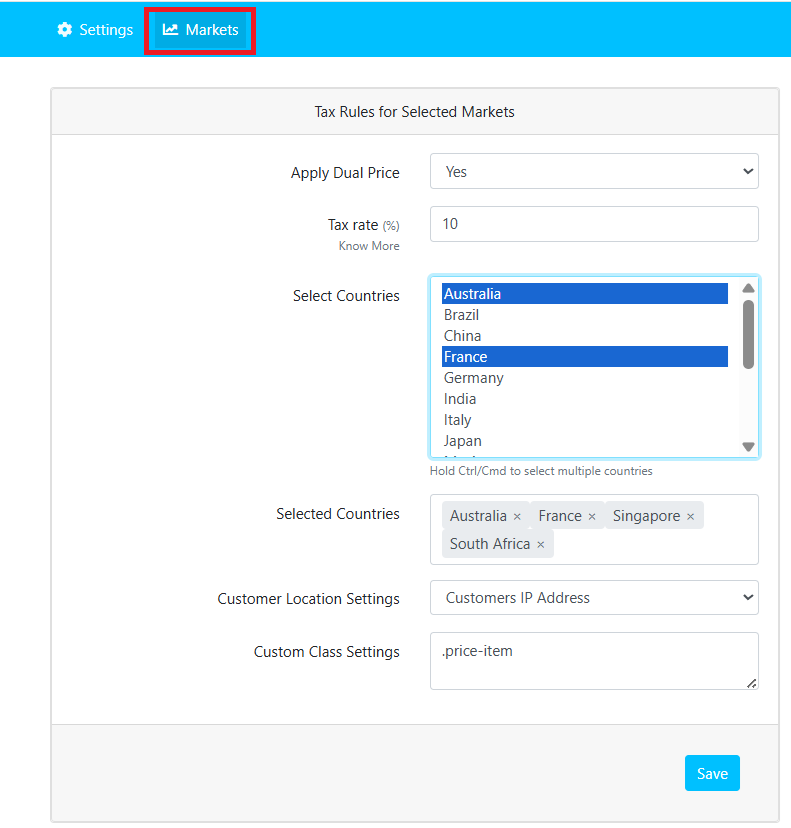
Note: The primary market of your store is automatically excluded from the country selection list. For this market, the Dual Price App’s default settings will be applied.
Step 4: Add Custom Price Class
Add the Custom Class for the product price element based on your currently published theme.
Example: .priceStep 5: Save
Click Save to apply your settings. The dual price display will now appear for the selected countries
Note: Dual app market feature is available on Basic plan.
If you have problems with the installation or finding difficulty, please raise a support ticket here or email us at [email protected] and we will take care of it.